Vision AI for Business Operations
Your cameras already watch the floor. Vision AI reads the CCTV you have, spots safety lapses, idle stations and defects, and records each one in DotOne against the right shift and line.
- Works with existing cameras
- Cloud or on-premise
- Every detection becomes a record
One system, six jobs your cameras can do
Safety checks on every shift
PPE and restricted-zone checks run on your existing CCTV. When something is missed, the supervisor gets an alert and a snapshot is saved to the incident log.
Book a Technical Consultation →See which stations are working
Camera by camera, see which stations are busy, idle or short-staffed. Idle time can be logged as downtime in production.
Book a Technical Consultation →Catch defects while the line runs
Cameras check products for surface, dimension, assembly and label defects as they move, and each rejection lands in the quality record.
Book a Technical Consultation →Patterns you can act on
Stored history shows recurring lapses and bottlenecks by camera, shift and line, so supervisors act before output suffers.
Book a Technical Consultation →Works with the cameras you have
IP and PTZ cameras connect directly, analog cameras through an encoder, and NVR or DVR systems over RTSP. In most plants nothing needs replacing.
Book a Technical Consultation →Every detection becomes a record
Detections land against the right shift, line and job in DotOne, next to your production, quality and HR data, so nobody re-types an incident.
Book a Technical Consultation →A whole factory in 3D, running on Vision AI and DotOne
Machines, stock, docks, trucks, people and alerts in one live view, with a shift timeline you can replay. Drag to look around, pick an area, or speed up time.
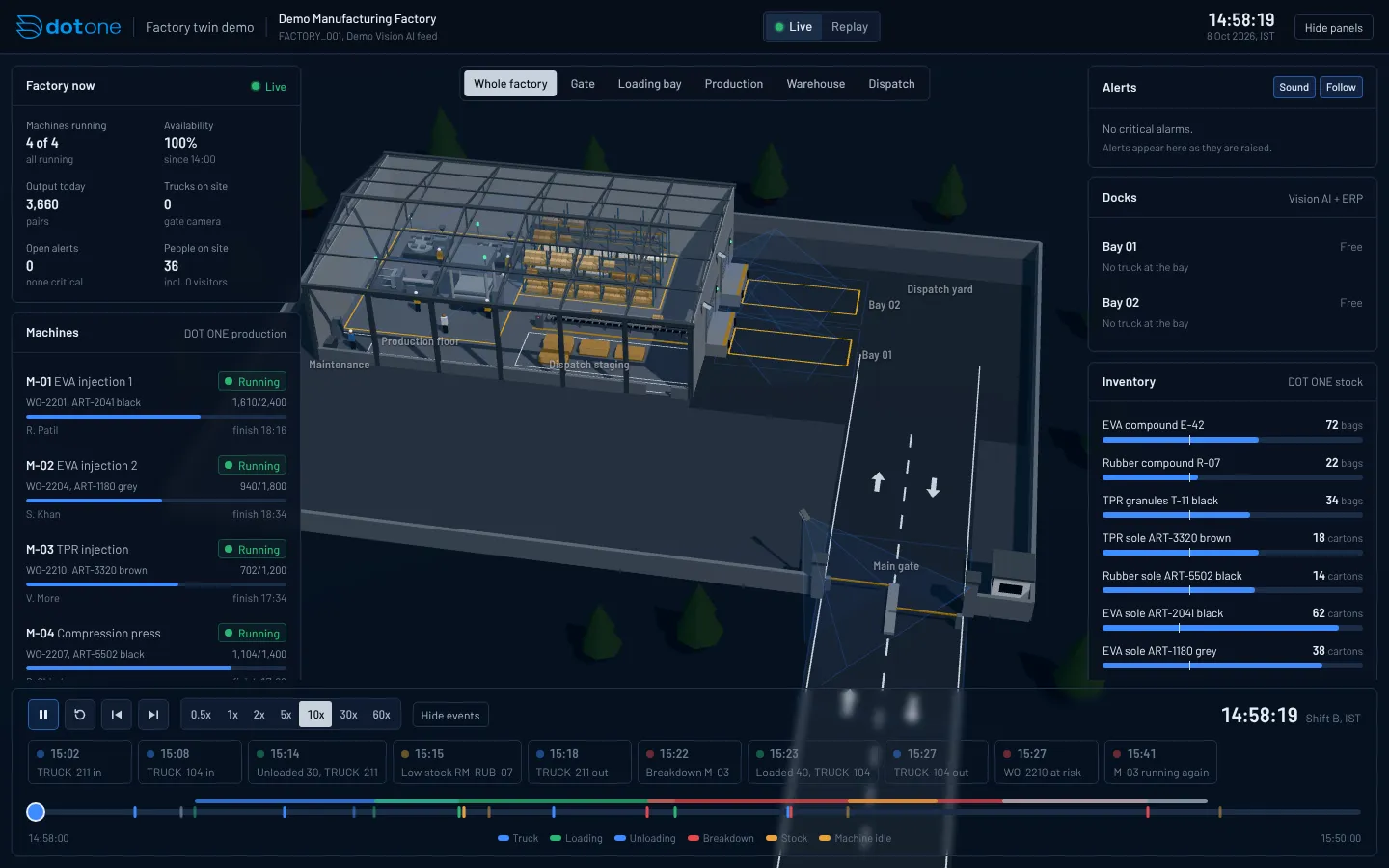
Demo factory and demo data. Works best on a laptop or desktop.
Cameras that do more than record
No new cameras in most plants
IP, PTZ, analog and NVR or DVR systems connect, so you start with the cameras already on the walls.
Alerts while it still matters
Supervisors hear about a missed vest or an entered zone during the shift, with a snapshot to see what happened.
Records, not just footage
Every detection becomes an entry in DotOne against the shift, line and job, next to production and quality data.
Your data, your rules
Cloud or on-premise, role-based access, encryption, audit logs and retention you set.
Ask what the cameras saw
The Quality AI Agent spots rejection patterns by machine, shift and vendor, and the Production AI Agent sees idle stations next to job cards and machine status.
Meet the Quality AI AgentFrequently asked questions
Do we need new cameras?
Usually not. Vision AI works with IP cameras, analog cameras through an encoder, and NVR or DVR systems with RTSP access.
Where does the data go?
Detections are recorded in DotOne against the shift and line, alongside your production, quality and HR records. You can choose cloud or on-premise deployment.
Who can see the camera data?
Access is role-based with audit logs, and data is encrypted. Retention periods can be configured to suit your policy.
How does a rollout work?
We start by checking your cameras and network and agreeing the use cases. Then we connect the streams, calibrate for your site, train your team and set up alerts before go-live.
See Vision AI on your own floor
Book a technical consultation. We review your cameras and network and pick the first use case with you.